| Quick Answer
Interactive smart boards and flat panel displays (IFP) in Pakistan combine 4K UHD anti-glare touchscreens, 20-point multi-touch writing, and native Android/Windows dual OS integration for modern universities and executive boardrooms. Replacing dim lamp projectors, Smart One Technologies provides certified interactive smart panels equipped with DrawView annotation software and nationwide institutional warranty support. |
If you walk into any university lecture hall, school classroom, or corporate boardroom in Pakistan right now, there’s a good chance you’ll still find a ceiling-mounted projector that needs the curtains pulled and a USB drive plugged into a laptop to work.
That technology is 20 years old. Interactive smart boards and flat panel displays (IFP) have replaced it — and for good reason. This guide explains exactly what they are, how they work, how to choose the right one, and how Smart One Technologies sets them up across Pakistan.
What Is an Interactive Smart Board — And How Is It Different?
An interactive smart board (also called an Interactive Flat Panel Display or IFP) is a large touchscreen — typically 65 to 110 inches — that mounts on a wall and works as your display, whiteboard, computer, and presentation tool all in one.
Here’s the core difference from a projector:
- A projector throws light onto a surface — that surface has no intelligence, no touch, and degrades in any ambient light.
- A smart board is the display itself — touch-sensitive, self-lit, readable in daylight, with a computer built in.
You can write on it with your finger or a stylus, annotate a live document, draw diagrams, switch to a browser, launch a video call, save everything you wrote — and then email it to every student or attendee before they leave the room. No projector can do any of that.
Smart Board vs Traditional Projector — Full Comparison
This is the question we get asked most. Here’s the honest side-by-side:
| Feature | Traditional Projector | SOT 4K Interactive Flat Panel |
| Display Resolution & Clarity | 1080p — washed out in daylight | True 4K UHD (3840×2160)
Anti-Glare Tempered Glass |
| Touch & Annotation | Non-touch, passive screen | 20-Point Multi-Touch
Infrared Writing Stylus |
| Ambient Light Performance | Requires curtains & dimmed room | 450 Nits — Full classroom
clarity in daylight |
| Maintenance & Consumables | Frequent lamp burnout
& filter cleaning costs |
Zero lamp maintenance
50,000+ hour lifespan |
| Software Ecosystem | External laptop cable dependent | Dual OS: Android 13 +
Windows OPS & DrawView |
The projector wins on nothing except initial purchase price — and even that advantage disappears within two to three years once you factor in lamp replacements, filter cleaning, and the productivity cost of a dim, non-interactive classroom.
Key Features to Look for in an Interactive Smart Board in Pakistan
- Screen Size — Match It to Your Room
Screen size is the first decision, and it depends entirely on your room depth and audience size:
- 65-inch panel — small meeting rooms, 10 to 15 people, up to 5 metres depth
- 75-inch panel — medium classrooms and boardrooms, 20 to 30 people, up to 8 metres
- 86-inch panel — large lecture halls and seminar rooms, 30 to 50 people, up to 12 metres
- 98 to 110-inch panel — auditoriums and large training centers, 50+ people
- Resolution — Why 4K Matters for Teaching
A 4K UHD display at 3840×2160 means text is sharp, diagrams are clear, and small fonts in spreadsheets or engineering drawings are legible from the back of the room. Standard 1080p on a 75-inch screen starts to show pixels. In a teaching environment where students are reading from the board, this is not a minor detail.
- Touch Points — 20-Point Multi-Touch
20-point multi-touch means multiple students or presenters can write on the board simultaneously. One draws a diagram on the left while another annotates on the right. In collaborative workshops or group teaching sessions, this transforms how people engage with the content.
- Anti-Glare Surface — Essential for Pakistan’s Classroom Conditions
Pakistani classrooms and conference rooms often have windows on the side. A standard glass panel becomes a mirror under sunlight. Anti-glare tempered glass with 450 nits brightness ensures the display stays readable in full daylight — no curtains, no dimming the room.
- Dual OS — Android 13 + Windows OPS Module
The best interactive panels run two operating systems simultaneously:
- Android 13 built-in — launch apps, browse, present, and annotate without connecting any external device. Ideal when a teacher walks into a room with just their Google account.
- Windows OPS module — slide in a full Windows PC unit into the panel. Your organisation’s software, Active Directory login, and network drives — all on the big screen.
You can switch between them with one tap. No cables. No adapters. No waiting for a laptop to boot.
DrawView Software — The Brain Behind the Smart Board
Hardware is only half the story. What makes a smart board genuinely useful in a university or corporate setting is the software running on it.
DrawView is the annotation and collaboration software that Smart One Technologies supplies with every IFP installation. Here’s what it does:
- Infinite whiteboard canvas — write, draw, and diagram without running out of space. Pan and zoom like a digital map.
- Multi-device sync — students can follow the board in real time on their own phones or tablets. What the teacher writes appears on everyone’s screen instantly.
- File annotation — open a PDF, Word document, or PowerPoint directly on the board and annotate over it. Highlights, arrows, notes — all saved.
- Screen recording — record the entire session, including audio, and export it for students who couldn’t attend or who want to review the lecture.
- Cloud save and share — one tap exports the session as a PDF or image and sends it to a shared folder or email list before anyone leaves the room.
For corporate boardrooms, DrawView adds real-time collaboration where remote participants on a video call can annotate the same canvas as the people in the room — closing the gap between hybrid and in-person meetings.
University Smart Board Setup in Pakistan — What It Actually Looks Like
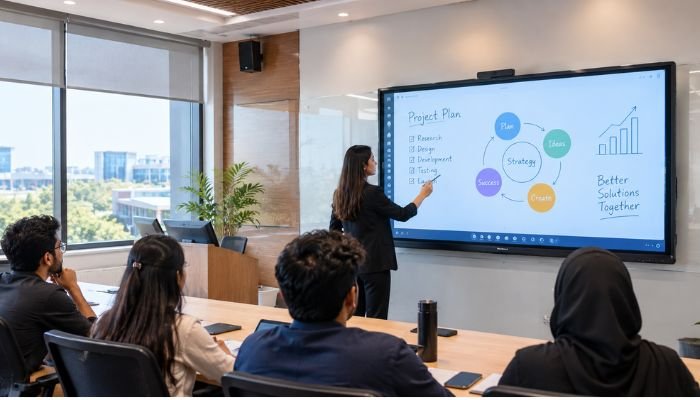
A typical university lecture hall installation by Smart One Technologies includes:
| 86-inch 4K IFP + Android 13 OS + DrawView + Wireless Screen Share + Wall Mount |
The panel mounts at the front of the room at a height that’s comfortable for a standing presenter — typically with the centre of the screen at about 160cm from the floor. Cable management runs through the wall to a power outlet and network port.
The wireless screen share module means any student with a laptop or phone can mirror their screen to the board without a cable — useful for student presentations without the shuffle of connecting hardware.
After installation, Smart One Technologies provides staff training — typically a two-hour session covering DrawView, screen sharing, file annotation, and session recording. Without training, expensive hardware sits underused. We’ve seen it happen. We always include the training.
Corporate Boardroom & Training Room Setup in Karachi, Lahore & Islamabad
Corporate setups have different priorities than university classrooms. The key requirements are:
- Zero setup time — a meeting starts in 30 seconds. No cables, no waiting for a laptop to pair.
- Video conferencing integration — the smart board works as the display, camera, and microphone array for Teams or Zoom calls.
- Security and network integration — Windows OPS module connects to corporate Active Directory, VPN, and shared drives.
- Touch-enabled remote collaboration — remote participants can annotate the same DrawView canvas as people in the room.
For interactive flat panel display setups in Lahore, Karachi, and Islamabad, Smart One Technologies handles site survey, installation, network configuration, and Microsoft Teams or Zoom integration as a complete package — not just dropping off a screen.
Smart Board Price in Pakistan — What Actually Drives the Cost
We won’t quote a single price because it changes with dollar rates, import duties, and specifications. What we can do is tell you exactly what moves the number:
| Smart Board Price Factors — Pakistan
1. Screen size — 65-inch vs 86-inch vs 98-inch is the biggest single jump in price 2. Resolution — 4K UHD costs more than Full HD, but for anything above 65 inches, 4K is not optional 3. Touch technology — 20-point infrared is standard; optical touch at higher density costs more 4. Built-in OS — Android-only panels are cheaper; dual OS (Android + Windows OPS) costs more but eliminates the need for a separate PC 5. Software licence — DrawView annual licence vs lifetime institutional licence affects total cost of ownership 6. Installation type — wall-mount vs mobile trolley vs ceiling bracket each have different hardware and labour costs 7. Warranty terms — 2-year on-site warranty from a Pakistani integrator vs 1-year bring-in warranty is a real cost difference |
The lowest total cost of ownership almost always comes from buying a larger, higher-spec panel once — rather than buying a cheaper panel that gets replaced in three years because the resolution isn’t sharp enough or the touch response is too slow for daily classroom use.
How to Choose the Right Interactive Smart Board for Your Institution
Three questions settle 80% of the decision:
- How deep is the room? This determines minimum screen size. Under 6 metres: 65–75 inch. 6–10 metres: 86 inch. Over 10 metres: 98 inch or larger.
- Who is the primary user? Teachers doing daily annotation need DrawView and a good stylus. Corporate presenters need seamless Teams/Zoom integration and zero-cable wireless sharing.
- Does your institution need network integration? If yes, you need the Windows OPS module and a proper network handover from your IT team. If no, Android-only is simpler and cheaper.
Smart One Technologies does a free site survey before recommending a specification. We measure the room, check natural light, note the network infrastructure, and ask about your content workflow — before we propose anything.
Frequently Asked Questions (FAQ)
Q: What is the price of an interactive smart board in Pakistan?
A: Smart board price in Pakistan varies by screen size, resolution, OS configuration, and brand. A 65-inch Android-based IFP starts at a different range than an 86-inch dual OS panel with Windows OPS. Smart One Technologies provides itemised quotes after a free site survey — contact us for your specific requirement.
Q: Which is better — a smart board or a projector for a classroom in Pakistan?
A: For any classroom built or upgraded today, a 4K interactive flat panel is the better choice. It works in daylight, requires zero lamp maintenance, supports multi-touch annotation, has a built-in computer, and lasts 50,000+ hours. The only scenario where a projector still makes sense is for very large auditoriums where the screen size needed exceeds 150 inches.
Q: What is DrawView software and does it come included?
A: DrawView is the annotation and collaboration platform that Smart One Technologies supplies with every IFP installation. It includes infinite whiteboard canvas, file annotation, screen recording, multi-device sync, and cloud export. Licence terms (annual vs institutional) depend on the deployment scale.
Q: Can the smart board connect to Microsoft Teams or Zoom?
A: Yes. With the Windows OPS module installed, the panel runs a full Windows environment — Teams, Zoom, Google Meet, and any other conferencing software works natively. Smart One Technologies configures the camera and microphone integration as part of the installation.
Q: What screen size smart board do I need for a university lecture hall?
A: For a lecture hall up to 8 metres deep: 86-inch. For a hall up to 12 metres: 98-inch. Beyond 12 metres, you may need a supplementary display at the rear or a large-format LED video wall at the front. Smart One Technologies measures your hall and models sightlines before recommending a size.
Q: Is a touch screen board suitable for teaching in Pakistani schools and universities?
A: Absolutely. A touch screen board for teaching replaces the traditional whiteboard and projector with a single device that a teacher can write on, annotate over documents, record sessions, and share content with students in real time. Smart One Technologies has deployed these across universities, schools, and corporate training rooms across Pakistan.
Final Word
The shift from projector to interactive flat panel is not a luxury upgrade — it’s a practical decision that pays back in teaching quality, meeting productivity, and zero maintenance cost within the first year.
Smart One Technologies is Pakistan’s authorised distributor for interactive smart touch displays, supplying institutions from Karachi to Islamabad with hardware, DrawView software, installation, and training as one complete package. 15 years. 500+ projects. Every installation backed by nationwide institutional warranty support.
| Ready to Upgrade to a Smart Board in Pakistan?
Tell us your room size, audience count, and use case — Smart One Technologies will recommend the right screen size, OS setup, and DrawView configuration for you. www.smartonetechnologies.pk | 15+ Years | 500+ Completed Projects |
0 Comments on “Interactive Smart Boards & Touch Panels in Pakistan: University & Corporate Setup Guide”