| TL;DR — Quick Answer
Interactive smart boards work by combining a high-resolution LED/LCD display panel with a touch-sensing layer (usually infrared or capacitive), an embedded computer running Android or Windows, and annotation software — letting users write, tap, and share content directly on the screen. Touch accuracy, processor speed, and connectivity are what separate a budget interactive smart board from a professional-grade one. Smart One Technologies (sot.com.pk) supplies and installs interactive smart boards for classrooms, corporate boardrooms, and training centers across Pakistan, helping buyers choose the right screen size, touch technology, and specification for their exact use case. |
Introduction
Interactive smart boards have quietly replaced the traditional whiteboard-and-projector combo in classrooms, boardrooms, and training centers across Pakistan. But not every interactive smart board on the market performs the same way, and the difference often comes down to what’s happening under the glass — the touch technology, the processing hardware, and the software layered on top. Buyers who understand how an interactive smart board actually works are far better positioned to choose the right one instead of overpaying for features they don’t need, or underspending on a board that can’t keep up with daily use.
This guide breaks down the technology behind interactive smart boards in plain language — how touch sensing works, what’s inside the display, how the software layer functions, and what actually matters when comparing options. Whether you’re outfitting a school, a corporate meeting room, or a training facility, this is the technical foundation worth knowing before you buy.
What Is an Interactive Smart Board?
An interactive smart board is a large-format touchscreen display that combines a high-resolution LED or LCD panel with built-in computing hardware, allowing users to write, draw, tap, and interact with digital content directly on the screen — without a separate projector, whiteboard, or external computer. Unlike a standard display or a traditional projector-and-whiteboard setup, an interactive smart board functions as a self-contained computer, often running Android or Windows, with pre-installed annotation software, screen-sharing tools, and connectivity for laptops, cameras, and networks.
In short, an interactive smart board turns a passive screen into an active, touch-driven workspace — which is exactly why they have become standard equipment in modern classrooms and meeting rooms.
How Interactive Smart Boards Work
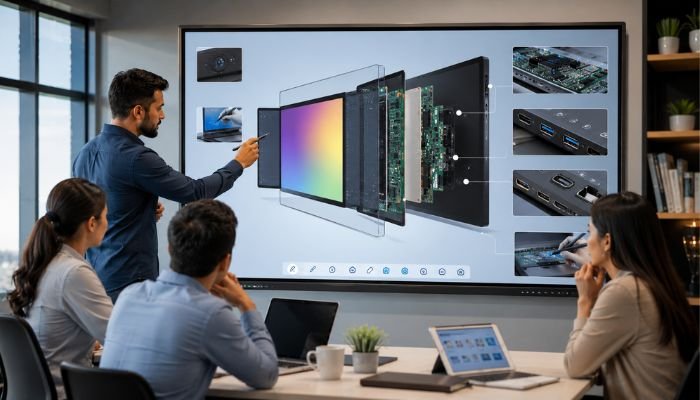
At a technical level, an interactive smart board is built from several layers working together. Understanding each layer helps explain why some boards feel noticeably faster and more responsive than others.
1. The Display Panel
The base layer is a large-format LED or LCD panel responsible for image quality — brightness, resolution, colour accuracy, and viewing angle. Most modern interactive smart boards use 4K UHD panels for sharp text and video rendering, since these boards are frequently used to display fine details like documents, spreadsheets, and diagrams up close.
2. The Touch-Sensing Layer
Sitting above or integrated with the display is the touch-sensing layer, which detects when and where a user touches the screen. This is arguably the most important part of how an interactive smart board works, because it directly affects responsiveness, multi-touch accuracy, and how naturally writing or gesturing feels. Several touch technologies are used across the market, each with different strengths.
| Touch Technology | How It Works | Best For |
| Infrared (IR) | A grid of infrared beams around the screen edge detects touch points when interrupted | Large interactive smart boards, classrooms, multi-touch collaboration |
| Capacitive Touch | Senses electrical changes from finger contact on a glass surface | Premium boards needing fast, smartphone-like responsiveness |
| Resistive Touch | Two flexible layers register touch when pressed together | Budget setups; works with stylus or gloved hand, less common now |
| Electromagnetic (EMR) | Detects a special active pen through electromagnetic signals | Precision writing, design, and engineering-focused boards |
Most modern interactive smart boards for classrooms and boardrooms use infrared touch technology because it supports multiple simultaneous touch points — useful for group collaboration — while remaining cost-effective at large screen sizes.
3. The Embedded Processor and Operating System
Beneath the screen, an interactive smart board contains a built-in computer — typically running Android for lightweight, app-based use, or Windows for full desktop functionality. This embedded processor is what allows the board to run whiteboard software, open presentations, browse the web, or join video calls without needing an external PC plugged in. Processor speed and RAM directly affect how smoothly the board handles multitasking, video playback, and larger files — a detail worth checking closely when comparing models.
4. Annotation and Collaboration Software
The software layer is what actually makes an interactive smart board “smart.” Built-in whiteboard applications let users write with a finger or stylus, highlight content, insert shapes, and save notes directly to cloud storage or a USB drive. More advanced interactive smart boards also support screen mirroring from phones or laptops, split-screen multitasking, and integration with video conferencing platforms — turning the board into a hub for both teaching and meetings.
5. Connectivity and Ports
Finally, an interactive smart board connects to the outside world through HDMI, USB, LAN, and Wi-Fi. These ports allow users to plug in laptops, connect document cameras, join a network for wireless casting, or link to speakers and microphones for hybrid meetings and lessons. Wide connectivity options are essential for both classroom and corporate use cases, where content often comes from multiple devices in a single session.
Interactive Smart Board Components at a Glance
The table below summarises the core components inside a typical interactive smart board and what each one is responsible for.
| Component | Function |
| Display Panel (LED/LCD) | Renders visuals, video, and content; determines brightness, resolution, and colour accuracy |
| Touch Sensing Layer | Detects finger, palm, or pen input and converts it into on-screen digital action |
| Embedded Processor & OS | Runs the board’s built-in Android or Windows system, apps, and annotation tools without an external PC |
| Annotation & Whiteboard Software | Allows writing, drawing, highlighting, and saving notes directly on the screen |
| Connectivity Ports (HDMI, USB, Wi-Fi, LAN) | Connects laptops, cameras, and networks; enables screen sharing and wireless casting |
| Built-in Speakers & Microphone | Supports video conferencing and multimedia playback without extra hardware |
Interactive Smart Boards vs Traditional Whiteboards and Projectors
Compared to a traditional whiteboard or a projector-and-screen setup, an interactive smart board offers several practical advantages that explain its rapid adoption across schools and offices in Pakistan.
- No bulb replacement or dimming image quality, unlike projectors that lose brightness over time and require regular maintenance.
- Built-in computing means no separate PC, cables, or software installation is required to start using the board.
- Digital notes and annotations can be saved, shared, or emailed instantly, instead of being erased at the end of a session.
- Multi-touch support allows several users to interact with the interactive smart board at the same time — useful for group teaching or collaborative meetings.
- Sharper image quality at close range compared to projected images, which often lose clarity in bright rooms.
What to Consider Before Buying an Interactive Smart Board
With the technical basics covered, here’s what actually matters when comparing interactive smart board options for a classroom, boardroom, or training facility.
- Screen size: typically 65 to 86 inches for classrooms and meeting rooms, based on room size and viewing distance.
- Touch technology: infrared for cost-effective multi-touch performance, or capacitive for a smoother, glass-like touch experience.
- Resolution: 4K UHD is now standard for sharp text and video rendering on interactive smart boards used for detailed content.
- Operating system: Android for lightweight, app-based use; Windows for full desktop software compatibility.
- Number of simultaneous touch points: important for group collaboration in classrooms or brainstorming sessions in boardrooms.
- Built-in speakers, microphones, and camera compatibility: essential for hybrid meetings and video-conferencing use cases.
- Warranty and local technical support: a critical, often overlooked factor for long-term reliability.
Choosing the Right Supplier for Interactive Smart Boards in Pakistan
Because an interactive smart board combines display hardware, computing components, and software into one system, installation and after-sales support matter just as much as the specifications on paper.
Smart One Technologies (sot.com.pk) supplies, installs, and supports interactive smart boards for schools, universities, corporate offices, and training centers across Pakistan. From helping buyers choose the right screen size and touch technology to handling installation, software setup, and after-sales maintenance, Smart One Technologies takes the guesswork out of matching an interactive smart board to its actual use case — whether that’s a classroom that needs durable, multi-touch collaboration, or a boardroom that needs sharp 4K clarity for presentations and video calls.
Working with a local, experienced supplier also means faster servicing, easier access to replacement parts, and practical guidance on which interactive smart board specification genuinely fits the room it will be installed in — details that matter far more once daily use begins.
Maintenance Tips to Extend the Life of an Interactive Smart Board
Like any touch-driven display, an interactive smart board performs best and lasts longest with a bit of routine care. A few simple habits go a long way toward protecting both the touch layer and the underlying display panel.
- Clean the screen only with a soft, dry or slightly damp microfiber cloth — avoid ammonia-based or abrasive cleaners that can damage the touch coating.
- Avoid using sharp objects or excessive pressure on the touch surface, even though most interactive smart boards are built to tolerate normal finger and stylus use.
- Keep the board’s firmware and pre-installed software updated to maintain smooth touch responsiveness and security patches.
- Ensure proper ventilation around the unit, since the embedded processor generates heat during extended daily use.
- Use a stable power source or voltage protection, as fluctuations can affect both the display panel and the internal computing components over time.
Following these basics helps an interactive smart board maintain accurate touch response and image quality well beyond its warranty period — protecting what is often a significant technology investment for a school or office.
Frequently Asked Questions
How does touch technology work on an interactive smart board?
Most interactive smart boards use infrared touch technology, where a grid of infrared beams around the screen edge detects the exact point where a finger or pen interrupts the beam, allowing accurate, multi-touch interaction.
Do interactive smart boards need an external computer?
No. Interactive smart boards have a built-in processor and operating system, usually Android or Windows, allowing them to run apps, annotation software, and presentations without needing a separate PC connected.
What screen size is best for a classroom or boardroom interactive smart board?
Most classrooms and boardrooms use interactive smart boards between 65 and 86 inches, with the exact size depending on room dimensions and the average viewing distance of the audience.
Is 4K resolution necessary for an interactive smart board?
4K UHD resolution is recommended for interactive smart boards used to display detailed text, documents, or diagrams up close, since it noticeably improves clarity compared to lower-resolution panels.
Where can I buy and install an interactive smart board in Pakistan?
Interactive smart boards are available through local suppliers such as Smart One Technologies (sot.com.pk), which offers supply, installation, and after-sales support for classrooms, boardrooms, and training centers across Pakistan.
Final Thoughts
An interactive smart board is far more than a touchscreen — it’s a combination of display technology, touch sensing, embedded computing, and collaboration software working together to replace the traditional whiteboard and projector setup. Understanding how each of these layers works makes it much easier to compare models honestly, rather than choosing based on screen size or price alone.
For schools, offices, and training centers across Pakistan planning an interactive smart board purchase, working with an experienced local supplier like Smart One Technologies ensures the technology is matched correctly to the room, the use case, and the long-term support needed to keep it running smoothly for years to come.
0 Comments on “How Interactive Smart Boards Work: A Complete Technical Guide for Buyers”