| TL;DR — Quick Answer
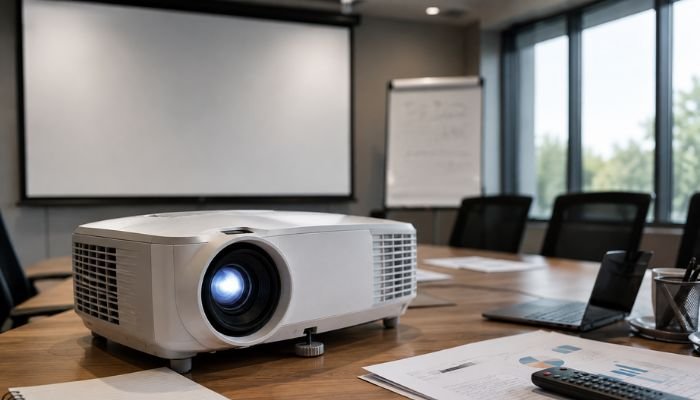
The most common multimedia projector buying mistakes in Pakistan include ignoring brightness (lumens) for the room’s actual lighting, choosing the wrong resolution, skipping throw-distance calculations, overlooking lamp replacement costs, and buying without a live demo. Before purchasing, match brightness and resolution to your room size and lighting, confirm connectivity (HDMI, wireless casting) matches your devices, and buy from a supplier offering warranty and after-sales support. Smart One Technologies helps buyers avoid these mistakes with live demos and guided multimedia projector selection based on real room conditions, not just spec sheets. |
Buying a multimedia projector looks simple on paper — pick a brand, check the price, done. In practice, it’s one of the easiest tech purchases to get wrong, because the specification that matters most (brightness) rarely gets the attention it deserves, while flashy but less relevant numbers grab all the buyer’s focus. Across classrooms, offices, mosques, wedding halls, and home theaters in Pakistan, the same handful of mistakes show up again and again — and they usually only become obvious after the projector is already installed and underperforming.
This guide walks through the 10 most common multimedia projector buying mistakes buyers in Pakistan make, and exactly how to avoid each one before you spend a single rupee.
Why Getting a Multimedia Projector Purchase Right Matters
A multimedia projector isn’t a small purchase, and it isn’t one you replace casually either — most businesses and institutions expect it to last several years across daily use. A wrong choice doesn’t just mean a dimmer picture; it means straining to read text in a bright classroom, spending more on lamp replacements than expected, or discovering too late that the unit can’t connect wirelessly to modern laptops and phones. Getting the specification right the first time saves money, frustration, and the awkward experience of presenting on a screen nobody can actually see clearly.
The 10 Multimedia Projector Buying Mistakes to Avoid
1. Ignoring Brightness (Lumens) for the Actual Room
This is, by far, the most common mistake. Buyers often pick a multimedia projector based on price or brand recognition without checking whether its brightness — measured in ANSI lumens — actually suits the room. A projector rated for 2,500 lumens might look perfectly fine in a dark demo room but wash out completely under classroom tube lights or daylight streaming through office windows. As a general guide, small dark rooms can work with 2,000–2,500 lumens, while brighter classrooms, conference rooms, or halls typically need 3,500 lumens or more to stay clearly visible.
2. Choosing the Wrong Resolution for the Content
Native resolution determines how sharp text, spreadsheets, and detailed images appear on screen. Buyers sometimes assume any HD-labeled projector is good enough, then discover that fine print, small charts, or detailed diagrams look blurry because the resolution doesn’t match the content being presented. For text-heavy presentations and classroom use, at least Full HD (1920×1080) native resolution is worth the extra cost over basic XGA models, especially for larger screen sizes.
3. Skipping Throw Distance Calculations
Throw distance is the space needed between the multimedia projector and the screen to produce a specific image size. Buyers frequently purchase a standard-throw projector for a small room, only to find they can’t physically fit enough distance to get a usable screen size — or they buy a short-throw model for a large hall where it can’t produce an image big enough for the back row to see. Always measure the intended installation space and check the manufacturer’s throw-distance chart before buying, not after.
4. Overlooking Lamp Life and Replacement Cost
The upfront price of a projector is only part of the real cost. Traditional lamp-based projectors need bulb replacements every 2,000–5,000 hours depending on usage mode, and replacement lamps can be surprisingly expensive — sometimes a significant fraction of the projector’s original price. Buyers who skip this calculation are often surprised a year or two later. Laser and LED light-source projectors cost more upfront but eliminate frequent lamp replacement, which can work out cheaper over several years of heavy daily use.
5. Not Checking Contrast Ratio
Contrast ratio — the difference between the brightest white and darkest black a multimedia projector can produce — directly affects how readable text looks and how much depth video content has. A high lumen count with a poor contrast ratio can still produce a washed-out, flat-looking image. Buyers focused only on brightness numbers sometimes end up with a projector that’s technically bright enough but visually unimpressive because contrast was never part of the comparison.
6. Ignoring Connectivity Options
Many older or budget projector models only offer basic VGA or single HDMI ports, which becomes a real problem when trying to connect modern laptops, phones, or streaming devices that expect HDMI, USB-C, or wireless casting. Before buying, buyers should list every device they’ll realistically need to connect and confirm the projector supports all of them, rather than assuming a cable adapter will solve everything later.
7. Focusing Only on Price, Not Total Value
The cheapest multimedia projector on the market is rarely the best long-term choice. A lower price often comes with a shorter warranty, weaker after-sales support, harder-to-find replacement parts, and lower build quality that struggles with daily use. Comparing total value — including warranty terms, support availability, and expected lifespan — usually leads to a smarter purchase than chasing the lowest number on a price tag.
8. Skipping a Live Demo Before Buying
Specification sheets only tell part of the story. Two projectors with identical lumen and resolution numbers can still look noticeably different in real use due to color accuracy, lens quality, and firmware processing. Buyers who purchase based purely on paper specs — without seeing the projector run in a room similar to their actual use case — sometimes end up disappointed by a picture that technically matches the spec sheet but doesn’t look as expected in person.
9. Underestimating Fan Noise
Projector fans that keep the lamp or laser cool can generate noticeable noise, which becomes a real distraction in quiet environments like meeting rooms, mosques, or lecture halls. Buyers focused entirely on picture quality sometimes overlook this until the unit is already running in a silent room and the fan noise competes with the presenter’s voice. Checking the manufacturer’s noise rating (measured in decibels) in advance avoids this surprise.
10. Not Matching Screen Size to Room Size
Finally, buyers often choose screen size arbitrarily rather than calculating it against room dimensions and seating distance. A screen too small forces people at the back to strain, while a screen too large for the room can distort the viewing experience up close. Pairing the right multimedia projector brightness and resolution with an appropriately sized screen — based on the farthest viewer’s distance — makes a measurable difference in how usable the setup actually feels.
Quick Checklist Before You Buy a Multimedia Projector
| Factor | What to Check |
| Brightness | Match ANSI lumens to actual room lighting, not just budget |
| Resolution | Full HD or higher for text-heavy or detailed content |
| Throw Distance | Confirm installation space matches the throw-distance chart |
| Light Source | Compare lamp-based vs laser/LED total cost of ownership |
| Contrast Ratio | Don’t rely on brightness numbers alone |
| Connectivity | Confirm HDMI, USB-C, and wireless options match your devices |
| Warranty & Support | Check terms and local service availability before buying |
| Noise Level | Check decibel rating for quiet-room use |
How Smart One Technologies Helps You Avoid These Mistakes
Rather than leaving buyers to guess from spec sheets alone, Smart One Technologies has been supplying and installing multimedia projectors across Pakistan since 2005, guiding buyers through brightness, resolution, and throw-distance decisions based on their actual room conditions rather than generic recommendations. Buyers can also experience real picture quality firsthand through the Multimedia Projectors Demo, avoiding the common mistake of purchasing a multimedia projector based purely on a spec sheet without seeing it perform in person.
For institutions and businesses evaluating a full setup — including screens and mounting — Smart One Technologies also offers projection screens and ceiling mount kits, helping match screen size, mounting height, and throw distance correctly the first time, backed by clear warranty terms and local after-sales support.
Pakistan-Specific Considerations When Buying a Multimedia Projector
Beyond the universal mistakes above, buyers in Pakistan face a few local conditions that deserve extra attention when choosing a multimedia projector.
- Voltage fluctuation and load-shedding: Unstable power supply in many areas can shorten lamp life or damage internal components over time. Pairing the projector with a voltage stabilizer or UPS is a practical safeguard, especially for institutions running long daily sessions.
- Dust exposure: Dusty environments, common across much of Pakistan, can clog air filters faster than manufacturer estimates, leading to overheating if filters aren’t cleaned regularly.
- Local parts and service availability: Even a well-specified projector becomes a liability if replacement lamps or filters have to be imported with long delays. Checking local stock availability before buying saves significant downtime later.
- Heat and humidity: Peak summer temperatures in many cities can affect projector cooling performance, making adequate room ventilation around the unit worth considering during installation.
These factors rarely appear on a manufacturer’s spec sheet, but they have a real impact on how long a multimedia projector performs reliably in everyday Pakistani conditions — which is exactly why buying from a local supplier who understands these realities matters as much as the hardware specification itself.
Frequently Asked Questions
How many lumens does a multimedia projector need for a classroom?
Most classrooms with normal lighting need at least 3,000–3,500 ANSI lumens to stay clearly visible. Darker rooms can work with less, while very bright rooms may need 4,000+ lumens.
Is a laser multimedia projector worth the extra cost?
For daily, long-term use, yes — laser and LED light sources eliminate frequent lamp replacement costs and typically last far longer than traditional lamp-based projectors, often making them cheaper overall despite a higher upfront price.
What resolution is best for a multimedia projector used for presentations?
Full HD (1920×1080) is generally the minimum recommended for text-heavy presentations, spreadsheets, or detailed diagrams, especially on larger screens.
Can I connect a multimedia projector to a laptop without HDMI?
It depends on the projector’s available ports. Many current models support HDMI, USB-C, and wireless casting, but older or budget models may be limited to VGA, so connectivity should always be confirmed before buying.
Why does my multimedia projector look dim even though it’s rated for high lumens?
This is often caused by a mismatch between brightness and contrast ratio, ambient room lighting exceeding the projector’s capability, or a lamp that has degraded over its usage hours and needs replacement.
Do I need a voltage stabilizer for a multimedia projector in Pakistan?
It’s strongly recommended. Voltage fluctuations and load-shedding are common in many areas, and unstable power can shorten lamp life or damage internal components over time, making a stabilizer or UPS a worthwhile safeguard.
Final Thoughts
Most multimedia projector buying mistakes come down to the same root cause: focusing on a single flashy number instead of matching the full specification to the actual room, lighting, and use case. Brightness, resolution, throw distance, light source, and connectivity all need to work together, not be evaluated in isolation. Taking the time to check each of these before purchasing — and seeing a live demo whenever possible — is what separates a projector setup that performs well for years from one that disappoints on day one.
| Not Sure Which Multimedia Projector Is Right for You?
Smart One Technologies helps you compare brightness, resolution, and throw distance with a real live demo before you buy. Get a free consultation and quote today. 📞 +92 321 408 6763 | ✉ sales@sot.com.pk | www.sot.com.pk |
0 Comments on “Multimedia Projector Buying Mistakes: 10 Things to Avoid Before Purchasing in Pakistan”