
| TL;DR — Quick Answer
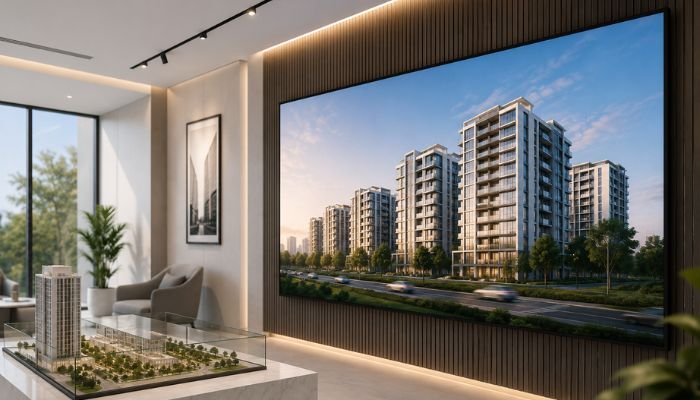
An SMD Screen is a modular LED display made from Surface-Mounted Device panels, and it converts real estate office visitors by shortening the gap between curiosity and decision — showing live pricing, drone footage, and floor plans the moment someone walks in, instead of making them wait for an agent to pull up a laptop. In Lahore’s real estate market, offices that install an SMD screen at the reception typically see shorter sales conversations, fewer repeat questions from clients, and a noticeably more professional first impression than offices still relying on printed brochures. Fastest win: a single reception-facing SMD screen showing a 5–8 minute rotating loop of current listings. Smart One Technologies installs and configures SMD screens for real estate offices across Lahore, including the content setup. |
Every Client Question a Screen Can Answer Before Your Agent Opens Their Mouth
Think about the first two minutes of a typical walk-in at a real estate office in Lahore. A prospective buyer sits down, and the agent’s first job isn’t selling — it’s explaining. What projects are currently available. What the payment plan looks like. What the unit actually looks like from the outside. All of that is repetitive information the agent has said a hundred times before, and it eats into the part of the conversation that actually closes deals: trust-building and negotiation. An SMD Screen placed where clients naturally wait or sit removes that repetitive layer entirely — by the time the agent sits down, the client has already seen the drone shot, the price range, and the floor plan on a loop playing quietly in the background. This piece looks at SMD screen technology specifically through that lens: not just as a display, but as a silent first agent working the room before the real one does.
The Technology in Plain Terms
SMD stands for Surface-Mounted Device — a way of packaging red, green, and blue LED chips together as one component rather than spacing them apart individually. Practically, this is why an SMD screen looks smooth and photographic up close instead of showing visible dots the way older LED signage did. The panels are also modular, built from individual cabinets that lock together, so a screen can be built to match your exact wall rather than forcing you to buy the nearest standard television size.
Quick Specs Reference
| Panel Type | SMD (Surface-Mounted Device) LED module |
| Recommended Pixel Pitch | P2.5 – P4 for typical reception viewing distances |
| Brightness | 600–1000 nits, tuned to indoor ambient lighting |
| Content Sources | USB media player, cloud CMS, or live network feed |
| Typical Install Time | 1–3 days depending on screen size and wall prep |
| Power Draw | Comparable to a mid-size commercial appliance; standard office wiring is usually sufficient |
| Warranty Range | Varies by panel grade; always confirm module-level warranty terms |
Mapping the Screen to the Client’s Actual Journey
Rather than thinking about the SMD screen as one generic display, it helps to think about what a visitor needs to see at each stage of their visit:
Stage 1: The Wait (0–3 minutes)
This is pure attention-capture time. Aerial project footage and lifestyle shots work best here — nothing text-heavy, since the visitor isn’t in reading mode yet, just observing.
Stage 2: The Warm-Up (3–7 minutes)
Once seated and settled, visitors start actively looking for specifics. This is where floor plans, unit categories, and a scrolling price ticker earn their place in the content loop.
Stage 3: The Consultation (post-greeting)
Once the agent sits down, the screen’s job shifts from passive playback to an active reference tool — pulling up a specific project on demand, comparing two unit types side by side, or replaying a client testimonial that reinforces what the agent is saying.
Designing content around these three stages, rather than just looping the same generic reel all day, is what separates a screen that quietly supports sales from one that’s just background noise.
What This Looks Like for Different Types of Real Estate Businesses
- Housing society sales offices: Larger screens showing master plan overviews, phase-wise availability, and amenity walkthroughs on rotation.
- Independent real estate agencies: Smaller screens mixing multiple developers’ listings, since agencies typically represent several projects at once rather than one.
- Plot marketing offices: Screens weighted heavily toward maps, plot numbers, and pricing grids rather than lifestyle video, since the buying decision here is more numbers-driven.
- High-end property consultancies: Smaller, premium-finish screens showing curated portfolios rather than a high-volume rotating reel, matching a more boutique sales approach.
How to Tell If Your SMD Screen Is Actually Working
Unlike a website or a social media ad, a physical office screen doesn’t come with a built-in analytics dashboard — but that doesn’t mean its impact can’t be tracked. A few practical signals worth monitoring over the first few months:
- Are agents fielding fewer repetitive basic questions (“what projects do you have available”) during initial conversations?
- Do walk-in visitors reference something specific they saw on the screen when starting a conversation with an agent?
- Has the average time-to-close on a first meeting shortened now that basic information is pre-absorbed?
- Do repeat visitors comment on updated listings, indicating they’re actually watching the content rather than tuning it out?
None of these require formal tracking software — a quick weekly check-in with your sales team is usually enough to tell whether the screen is earning its keep.
A Practical Content Refresh Schedule
- Weekly: Update the price and payment plan ticker to reflect any changes.
- Bi-weekly: Rotate in new drone footage or unit photos as new phases or listings become available.
- Monthly: Refresh testimonial clips and swap out any promotional offers that have expired.
- Quarterly: Review the full playlist order and remove any content tied to sold-out phases or discontinued projects.
Getting From Idea to Installed Screen
In practice, most office installations move through three phases: a short site visit to confirm wall space and viewing distance, a build phase where the screen is mounted and calibrated, and a content phase where the initial playlist is loaded and the office team is trained on making updates themselves. For a typical single-screen reception setup, this whole process usually wraps up within a few days rather than weeks — the larger time factor is usually how quickly the office can gather its own listing photos and videos to load onto the screen.
Why Real Estate Offices Work With Smart One Technologies
Smart One Technologies installs SMD screens for real estate offices, sales galleries, and property expos across Lahore, and the part of the job that tends to matter most to clients isn’t the hardware — it’s the handover. Getting a content management system set up so office staff can update listings and pricing themselves, without waiting on a technician every time something changes, is what keeps a screen genuinely useful six months after installation instead of frozen on day-one content.
If you’re evaluating a supplier, ask directly how they handle content training and whether updates require ongoing technical support — that answer tells you more about long-term usability than any spec sheet will.
Frequently Asked Questions
Does an SMD screen actually reduce sales conversation time?
Indirectly, yes. By pre-answering basic questions about pricing, layout, and availability before a client sits down with an agent, the conversation can move faster into the details that actually influence a buying decision.
What kind of content should play first when a visitor walks in?
Attention-grabbing visuals like drone footage or lifestyle shots work best in the first few minutes, before switching to more detailed content like floor plans and pricing once the visitor is seated.
Can office staff update the screen content without technical help?
Yes, most modern SMD screen installations include a simple content management system that lets non-technical staff update images, videos, and pricing tickers directly.
How do I know if my content playlist is too long?
If a visitor sitting for the average wait time sees the same clip twice, the loop is too short; if the loop runs so long that early content feels outdated by the time it repeats, it’s too long. Five to eight minutes is a reasonable starting point for most offices.
Is one screen enough, or do I need multiple displays in my office?
A single reception-facing screen is usually enough for smaller offices, while larger offices with multiple agent consultation areas often benefit from a secondary screen showing project-specific content during individual meetings.
Who installs and sets up SMD screens for real estate offices in Lahore?
Real estate businesses typically work with an experienced supplier such as Smart One Technologies, which handles installation, calibration, and content management training as part of the setup.
Final Thoughts
The real value of an SMD screen in a real estate office isn’t that it looks impressive — plenty of screens do that and still get ignored within a month. The value comes from treating it as a working part of the sales process: mapped to what a visitor actually needs to see at each stage of their visit, refreshed on a schedule instead of left static, and easy enough for your own team to update without waiting on outside help. Get those three things right, and the screen stops being office decoration and starts quietly doing part of the agent’s job before the conversation even begins.
| Ready to Put Your Screen to Work?
Get a free site visit and content setup walkthrough for an SMD Screen from Smart One Technologies. Visit sot.com.pk to request a quote today |

0 Comments on “SMD Screen for Real Estate Offices in Lahore: Display Solutions That Convert Visitors”