
| TL;DR — Quick Answer
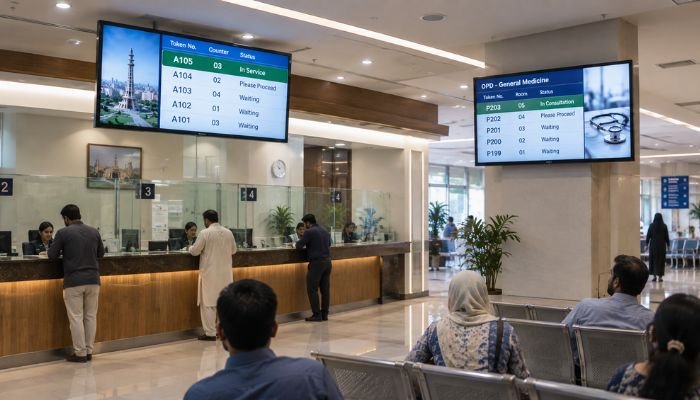
Digital Signage SMD Screens manage queues by connecting a token or number-calling system to a display that shows the current number being served, the counter or room it’s assigned to, and often an audio announcement, replacing shouted names, paper tokens, and the guesswork that makes waiting rooms feel chaotic. In Lahore’s banks, this typically means a screen above the teller counters synced to a token dispenser at the entrance; in hospitals, it usually means an OPD lobby screen linked to the appointment or token system, showing which patient should proceed to which consultation room. Setting this up properly involves choosing the right screen size and mounting position for the room, integrating the display with the queue management software rather than running it as a standalone slideshow, and planning for audio-visual announcements so patients and customers with limited literacy or visual impairment aren’t left out. Smart One Technologies designs and installs digital signage SMD screen queue management systems for banks and hospitals across Lahore, built around the specific patient or customer flow of each facility. |
Why Queue Management Is About Perception, Not Just Speed
A queue management system doesn’t actually make a bank teller or a doctor work faster — what it changes is how the wait feels to the person standing or sitting in it. Unmanaged queues create a specific kind of stress: not knowing how many people are ahead, not knowing if you’ve been skipped, and not knowing when to expect your turn. A visible, accurate Digital Signage SMD Screen removes all three uncertainties at once, and that’s a large part of why queue management technology consistently improves customer satisfaction scores even in facilities where average service time barely changes.
This matters more in Lahore’s busiest bank branches and hospital OPDs than it does in a quiet suburban clinic. High-footfall environments — a commercial bank branch on Main Boulevard Gulberg, or the outpatient department of a busy private hospital — are exactly where a paper token system or a shouted name breaks down, because the room is too loud, too full, or the queue too long for anyone to reliably track their position without a screen telling them.
How Digital Signage SMD Screens Actually Work for Queue Management
The Token or Appointment Source
Every queue management deployment starts with something generating the number or ticket — a token dispenser at a bank entrance, or an appointment and token system tied to a hospital’s patient registration software. The Digital Signage SMD Screen doesn’t generate this data; it displays it, which means the display is only as good as the system feeding it.
The Queue Management Software
Between the token source and the screen sits queue management software that tracks which number is currently being called, which counter or room is calling it, and how many numbers remain in the queue. This software typically also drives an audio announcement, logs average wait times for reporting, and can route different queue types (cash counters versus customer service, or general OPD versus specific specialist departments) to different displays.
The Display Itself
This is where the Digital Signage SMD Screen comes in — typically mounted in a visible, elevated position above the counters or seating area, showing the current number, the counter or room assignment, and often a secondary rotating panel with promotional content, health information, or general announcements. For smaller branches or single-department waiting areas, a large-format LCD digital standee can serve the same function; SMD screens are generally chosen for larger lobbies, multi-counter environments, or where the display also needs to handle other promotional content between queue updates.
The Audio Layer
A queue call that’s only visual can be missed by someone looking at their phone or seated at the back of a crowded lobby, so most well-designed systems pair the screen with an audio announcement — a number and counter called both aloud and on-screen. This matters particularly in hospital settings, where elderly patients or those with visual impairment rely on the audio cue as much as, or more than, the screen itself.
Queue Management in Lahore’s Banks
Counter and Token Integration
A typical bank branch deployment links a token dispenser at the entrance to a Digital Signage SMD Screen mounted where it’s visible from every seat in the customer waiting area, showing the currently called number against its assigned counter — cash deposit, cash withdrawal, customer service, or a dedicated forex counter where currency exchange is offered.
Combining Queue Data With Branch Promotion
Bank lobbies rarely dedicate an entire screen purely to queue numbers. Most branches split the display between the active queue information and rotating content promoting savings products, digital banking services, or current exchange rates, which is one of the reasons banks in Lahore increasingly favor SMD screens over simple LED number boards — the same display earns its space by doing double duty as both operational signage and a marketing surface. Our broader look at custom SMD screen solutions for banking environments covers this dual-purpose approach to branch signage in more depth.
Peak-Hour Load Considerations
Salary disbursement days, the start and end of each month, and Ramadan banking hours create predictable peak-load periods in Lahore branches, and a queue management system needs to handle a much higher token volume on these days without the display lagging behind the actual counter calls — a software and network reliability question as much as a hardware one.
Queue Management in Lahore’s Hospitals
OPD Token and Room Assignment
A hospital’s outpatient department typically links patient registration or appointment check-in to a token number, displayed on a lobby Digital Signage SMD Screen alongside the consultation room or doctor’s name the patient should proceed to. This is meaningfully more complex than a bank’s counter system, since a hospital may be routing dozens of simultaneous queues across different specialties from a single central display or a set of department-specific screens.
Integration With Wayfinding
Queue management in a hospital rarely works in isolation from wayfinding — a patient needs to know both their number is being called and where that department physically is, particularly in larger hospital buildings where cardiology, radiology, and general OPD may be on different floors. Our more detailed guide to digital signage solutions for hospitals and clinics in Pakistan covers this combined queue-and-wayfinding approach across a full hospital deployment, beyond queue management alone.
Sensitivity and Privacy Considerations
Healthcare queue displays need to balance clarity with patient privacy — showing a token number and room assignment rather than a patient’s full name, particularly for departments where the nature of the visit itself carries sensitivity. This is a design consideration a general retail or banking queue system doesn’t need to account for in the same way.
Bank vs. Hospital Queue Management: Where the Requirements Differ
| Factor | Bank Branches | Hospitals |
| Queue complexity | Usually 2–5 counter types | Often dozens of parallel department queues |
| Display content split | Queue data plus product promotion | Queue data plus wayfinding and health information |
| Peak load pattern | Predictable (month-end, salary days) | Less predictable, driven by walk-ins and emergencies |
| Privacy consideration | Low | Higher — avoid displaying full patient names |
| Typical screen placement | Above teller counters, lobby-visible | Central OPD lobby plus department-level screens |
Choosing the Right Digital Signage SMD Screen for a Queue System
- Screen size and pixel pitch should match the room’s dimensions and the furthest seating distance — a small lobby can use a more compact panel, while a large hospital OPD waiting hall needs a larger, finer-pitch screen to stay legible from the back row.
- Mounting height and angle need to keep the display visible from every seat without glare from overhead lighting or entrance-facing windows, a particularly common issue in glass-fronted Lahore bank branches.
- Brightness should account for natural light from entrance doors and windows, since a queue screen that’s hard to read in daylight defeats its own purpose.
- Software compatibility matters more than raw display specification — the screen needs to integrate cleanly with the facility’s existing token or hospital management software rather than running as a disconnected slideshow that staff have to update manually.
Audio integration should be planned alongside the screen rather than added afterward, since retrofitting announcement speakers into an already-installed system is more disruptive than including them in the initial design. Our audio systems page covers the kind of clear, intelligible sound reinforcement this application needs.
Step-by-Step: Deploying a Queue Management SMD Screen System
- Map the queue flow — identifying how many counters, departments, or rooms need separate queue tracking.
- Choose or confirm the queue management software — whether integrating with an existing bank or hospital management system, or deploying dedicated queue software.
- Select screen size, pixel pitch, and placement — based on room dimensions, seating layout, and viewing distance.
- Plan audio announcement integration — placement of speakers relative to the waiting area for clear, non-overlapping announcements.
- Install and integrate — mounting the display and connecting it to the token or appointment system’s data feed.
- Test under real load — running the system during a busy period before full rollout to confirm the display keeps pace with actual call volume.
- Train front-desk and counter staff — ensuring the team understands how to manage exceptions, like a patient or customer who needs to be recalled or reprioritized.
Common Mistakes in Queue Management Signage Deployments
- Treating the screen as decoration rather than integrated signage: A display that isn’t actually connected to the live token system quickly becomes ignored once customers realize it’s inaccurate.
- Undersizing the screen for the room: A queue number that can’t be read from the back of a full waiting area defeats the purpose of the system.
- Skipping audio announcements: Visual-only queue calls exclude patients and customers who aren’t looking directly at the screen when their number comes up.
- Displaying full names in healthcare settings: This creates an avoidable privacy issue that a token-number-only display sidesteps entirely.
- No plan for peak-load testing: A system that works fine during a quiet demo can lag or freeze during month-end banking rushes or a hospital’s busiest OPD hours if it wasn’t tested under realistic load.
Why Banks and Hospitals in Lahore Work With Smart One Technologies
Smart One Technologies designs Digital Signage SMD Screen queue management systems around each facility’s actual patient or customer flow rather than installing a generic display and leaving the integration work to the client. Our approach covers the full deployment — screen selection, software integration with existing token or hospital management systems, audio announcement planning, and staff training — for banking and healthcare clients across Lahore. Browse our full range of indoor and outdoor SMD screens to compare options for lobby and counter-area displays, or explore our digital standee solutions for smaller waiting areas where a freestanding display fits better than a wall-mounted screen.
Frequently Asked Questions
What is a digital signage SMD screen queue management system?
It’s a display connected to a token or appointment system that shows the current number being served and its assigned counter or room, replacing paper tokens or shouted names with a clear, continuously updated visual (and usually audio) cue.
Can the same SMD screen be used for both queue numbers and promotional content?
Yes, and this is common practice in Lahore bank branches, where the display splits its space between live queue data and rotating promotional or informational content rather than dedicating the full screen to numbers alone.
How is hospital queue management different from a bank’s system?
Hospitals typically manage a larger number of parallel department queues, need to integrate queue data with wayfinding to the correct consultation room, and should avoid displaying full patient names for privacy reasons — requirements a simple bank counter system doesn’t usually need to handle.
Do queue management screens need audio announcements as well as visual display?
Yes, ideally. A visual-only system can be missed by patients or customers not looking directly at the screen, so pairing the display with a clear audio call improves reliability, particularly for elderly or visually impaired visitors.
What screen size is needed for a hospital OPD queue display?
It depends on the waiting area’s size and seating distance, but larger OPD lobbies generally need a bigger, finer-pixel-pitch SMD screen than a small bank branch counter display to remain legible from the back of a full waiting room.
Who installs queue management digital signage for banks and hospitals in Lahore?
Facilities typically work with an experienced integrator such as Smart One Technologies, which handles screen selection, software integration with existing queue or hospital management systems, and audio announcement planning as one coordinated project.
Final Thoughts
A Digital Signage SMD Screen queue management system succeeds or fails on integration, not just display quality. The screen itself is only the visible layer of a system that depends on accurate, real-time data from a token dispenser or hospital management platform, clear audio announcements for reliability, and a size and placement that keeps the display legible from every seat in the room. Banks and hospitals in Lahore that plan queue management as a complete system — software, hardware, audio, and staff process together — see the real benefit: shorter-feeling waits, fewer complaints, and a noticeably calmer lobby, even on the busiest days.
| Looking to Deploy Queue Management SMD Screens for Your Bank Branch or Hospital in Lahore?
Get a free site assessment and a queue management display system built around your facility’s actual patient or customer flow from Smart One Technologies. Visit sot.com.pk to Request a Consultation Today → |

0 Comments on “How to Use Digital Signage SMD Screens for Queue Management in Lahore Banks and Hospitals”