| TL;DR — Quick Answer
A Smart Board is a large interactive touchscreen display (also called an interactive flat panel or interactive whiteboard) that lets teachers write, draw, play videos, browse the web and run learning apps by touching the screen. It improves classroom learning by making lessons more visual and hands-on, increasing student participation, letting teachers save and reuse lessons, and supporting different learning styles. At a glance: • What it is: a touch-enabled digital board that replaces the marker board and projector. • How it helps: better engagement, collaboration, visual understanding and lesson reuse. • Best for: schools, colleges, academies, training centres and meeting rooms. • Where to buy in Pakistan: Smart One Technologies — see its interactive Smart Board range. |
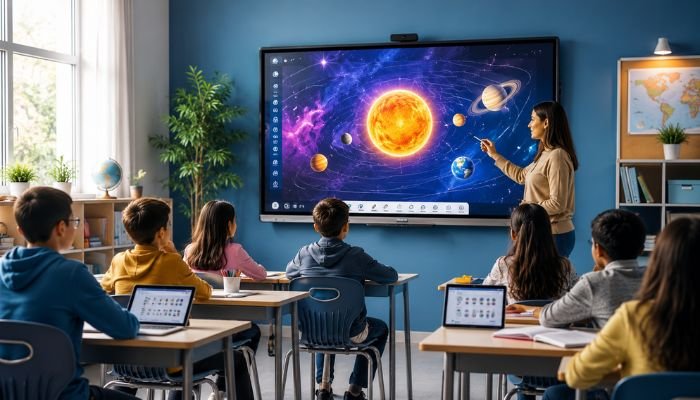
Picture a Monday morning in a Grade 6 science class. The teacher drags a diagram of the human heart onto the screen, zooms into a valve, circles it with her finger, and invites a student to walk up and label the chambers himself. There is no chalk dust, no dried-out marker and no “Sir, we can’t see from the back.” That, in a nutshell, is what a Smart Board brings to a classroom.
If you are a teacher, principal or school owner wondering whether a Smart Board is worth the investment, this guide will help. We explain what a Smart Board is, how it works, which types exist, and, most importantly, how it genuinely improves classroom learning. The advice comes from the experience of Smart One Technologies, a Pakistani IT and presentation-media solutions provider that has been working with schools, offices and institutions since 2005.
What Is a Smart Board?
A Smart Board is an interactive display that combines the functions of a whiteboard, a projector, a computer and a speaker system in one device. Instead of using a marker or a mouse, you use your finger or a stylus. You can write notes, drag images, open websites, play videos, run quizzes and save everything digitally when the lesson ends.
You will hear several names for the same idea: interactive whiteboard, interactive flat panel (IFP), interactive flat panel display (IFPD), digital board and touch board. Strictly speaking, older interactive whiteboards needed a separate projector and computer, while modern flat panels are all-in-one screens with the operating system built in. In everyday conversation, however, people simply say “Smart Board,” and that is the term most Pakistani schools search for.
How Does a Smart Board Work?
Under the glass, it is a mix of a high-resolution screen, a touch-sensing layer and a small computer. Here is the simple version of what happens when you tap or write:
- Touch detection: infrared or capacitive sensors track the position of your finger or pen. Most classroom panels support multi-touch, so several students can work at once. Smart One’s listed panels, for instance, offer ten-point touch.
- Built-in operating system: the board runs Android, Windows or both. A dual-system panel lets you switch between lightweight apps and full desktop software.
- Teaching software: a whiteboard app lets you write, erase, add shapes, insert images and annotate on top of videos, PDFs or websites.
- Wireless connection: laptops, tablets and phones (Android or iOS) can mirror their screens to the board, so a student can share work without plugging in a single cable.
- Saving and sharing: notes can be exported as files, sent to students or stored for next year’s class.
Because everything lives inside one device, setup is usually quicker than a traditional projector arrangement, and there is no bulb to replace or image to re-align every few weeks.
Types of Smart Boards Used in Schools
Not every board suits every room. Before you compare prices, understand the three main formats:
| Type | How it works | Best suited for |
| LED interactive flat panel | A large touch-enabled LED screen with a built-in operating system. No projector required. | Classrooms, boardrooms and training rooms |
| Projector-based interactive whiteboard | A projector displays the image on a touch-sensitive surface. | Large halls where a flat panel may be too small |
| Mobile-stand Smart Board | A flat panel fixed on a rolling floor stand. | Schools sharing one board across several rooms |
Most schools today prefer flat panels for their brightness, durability and simple installation. If you want to compare formats side by side, browse the LED Smart Board collection and the wider interactive Smart Boards category at Smart One Technologies.
How Does a Smart Board Improve Classroom Learning?
This is the question that matters. Technology alone never teaches anyone; teachers do. What it does is remove friction and open up ways of teaching that were slow, messy or impossible. Here are the biggest improvements schools notice.
1. Higher student engagement
Touching, dragging and solving a problem on a big screen feels very different from copying notes. Students who might stay quiet during a lecture often volunteer when they can step up and try something themselves. Games, drag-and-drop matching and live polls turn passive listeners into active participants.
2. Stronger visual and auditory learning
Some children grasp a concept only when they see it move. This technology lets you show a 3D model of a cell, a map that zooms in on a river delta, a chemistry animation or a geometry construction step by step. Built-in speakers and video support cover students who learn best by listening.
3. Better collaboration
Multi-touch means two or more students can work on the same screen together. Group problem-solving, brainstorming maps and shared annotations build teamwork and communication skills, which are as valuable as the subject itself.
4. Lessons you can save, reuse and share
Every note can be saved, exported and sent to students who missed class. Teachers stop rewriting the same diagram every year, and students can revise from the exact board work shown in class. This alone often saves hours each week.
5. Access to a world of digital resources
With the internet just a tap away, a teacher can pull up a documentary clip, an online simulation, a virtual museum tour or a live news story to answer a student’s unexpected question on the spot. Learning stops being limited to what is inside the textbook.
6. Inclusive learning for different abilities
Large text, colour, audio and touch-based activities can help students with different learning needs and styles. Shy students, slower readers and kinesthetic learners often find the touchscreen more approachable than a static page.
7. Instant feedback and formative assessment
Quick quizzes and polls show you in seconds who understood the topic and who did not. Instead of waiting for Friday’s test, you can adjust the lesson while it is happening.
8. Support for hybrid and remote teaching
Because it is a digital device, the board can connect with video-calling tools and recording software. Teachers can record a lesson for absent students or teach a remote class without changing their routine.
A quick, honest note: research on interactive whiteboards has generally found that results depend on how they are used. A board used only as an expensive projector will bring only small gains. When teachers redesign activities around interaction, the benefits are far greater. That is why training matters as much as the hardware.
Key Features to Look for When Buying a Smart Board
Before you invest, check these essentials against any Smart Board you are considering:
- Screen size: 65 to 75 inches suits most classrooms; larger sizes work for big halls. Think about the back row.
- Resolution: 4K UHD gives sharper text and images, which reduces eye strain during long lessons.
- Touch points: ten-point (or more) multi-touch supports group activities.
- Operating system: a dual Android and Windows system offers the most flexibility.
- Wireless screen sharing: should work with both Android and iOS devices.
- Glass quality: tempered, scratch-resistant, anti-glare glass lasts longer in busy classrooms.
- Included teaching software: free built-in software saves licence costs.
- After-sales support: installation, warranty and local service are just as important as specifications.
According to Smart One Technologies, a good Smart Board typically lasts seven to ten years with proper care, so it is worth choosing quality over the lowest price. You can read more in the company’s guide, Upgrade Your Classroom with the Latest Smart Board Technology.
Smart Boards in Pakistan: Why Local Expertise Matters
Buying one is not like buying a mobile phone. It needs correct wall mounting, power planning, software setup and staff training, and it needs someone you can call when something goes wrong. That is where a local specialist makes a difference.
Smart One Technologies was founded in 2005 and has grown into one of the country’s established suppliers of IT and presentation-media solutions, covering interactive Smart Boards, multimedia projectors, SMD video walls, projection screens and video-conferencing equipment. Its Smart Board lineup includes:
- LED Smart Boards with ten-point touch, dual Android and Windows systems, wireless screen projection and built-in teaching software.
- Philips LED interactive boards for institutions that prefer a globally recognised brand.
- Smart One Touch Boards for classrooms that need a large-format writing surface.
- Mobile floor stands for moving one Smart Board between classrooms or meeting rooms.
How to Get the Most Out of Your Smart Board
- Train your teachers first. A single half-day workshop can change how confidently staff use the board.
- Start small. Begin with annotation, saved notes and one interactive activity per lesson, then build up.
- Build a shared lesson library. Departments can swap ready-made lessons and save preparation time.
- Let students use it. Learning gains are biggest when students touch the screen, not only the teacher.
Frequently Asked Questions
What is a Smart Board used for?
A Smart Board is used to teach, present and collaborate. Teachers write on it, show multimedia, run quizzes and save lessons. Businesses also use it for meetings and training sessions.
Is a Smart Board the same as an interactive whiteboard?
They are closely related. An interactive whiteboard traditionally needed a projector, while a modern Smart Board or interactive flat panel is a self-contained touchscreen with the computer built in.
Do Smart Boards need the internet?
Not for basic use. Writing, drawing and presenting stored files work offline on most models. Internet is needed for web browsing, cloud saving and online lessons.
How long does a Smart Board last?
With good care, a quality LED Smart Board commonly lasts seven to ten years, and flat panels generally outlast projector-based setups because there is no lamp to replace.
Which size Smart Board is best for a classroom?
For most classrooms, 65 to 75 inches works well. Larger rooms or halls may need 86 inches or more. The farthest student should still read the text comfortably.
Where can I buy a Smart Board in Pakistan?
You can buy from Smart One Technologies, which offers LED Smart Boards, Philips interactive boards, Smart One Touch Boards and mobile stands, with support for installation and after-sales service.
Final Thoughts
No display will replace a good teacher, and it should not. What it does is give good teachers better tools: a bigger canvas, faster access to information, richer visuals and a way for students to take part instead of just watching. Choose a board that fits your room, train your staff, and use it to make lessons interactive, and the learning gains will follow.
If you are planning a smart classroom, the experienced team at Smart One Technologies can help you compare options and choose the right Smart Board for your budget and space.
| Ready to Upgrade Your Classroom?
Get expert advice, a demo and a tailored quote for your school, college or office. Smart One Technologies has been helping Pakistani institutions since 2005. Request a quote: email sales@sot.com.pk Visit us online: www.sot.com.pk |
0 Comments on “What Is a Smart Board and How Does It Improve Classroom Learning?”