| 💻 TL;DR — Quick Answer
How do interactive smart boards work? The complete technical explanation. Interactive smart boards work by combining a large-format LED display panel with an infrared or capacitive touch-sensing layer, an embedded octa-core processor, a built-in Android/Windows OS, collaboration software, and multi-protocol wireless/wired connectivity. When a user touches or writes on the screen, the touch layer detects the XY coordinates and sends them to the embedded processor in under 35ms. The processor maps the input to the active application — writing ink, launching apps, zooming maps, or initiating video calls. Built-in Wi-Fi 6, HDMI, USB-C, and screen-sharing (Miracast + AirPlay) allow any device to connect instantly. Smart One Technologies (sot.com.pk) supplies 65–98 inch interactive smart boards with 4K resolution, 20-point multi-touch, dual OS, and professional installation across Pakistan. One-Line Summary: An interactive smart board = large touchscreen + built-in computer + collaboration software — replacing the whiteboard, projector, and PC with one device. |
Introduction
Every month in Pakistan, universities, schools, corporate offices, and government institutions purchase interactive smart boards without fully understanding how the technology works. The consequences are predictable: mismatched specifications, underperforming displays, and technology that fails to solve the problems it was bought to address.
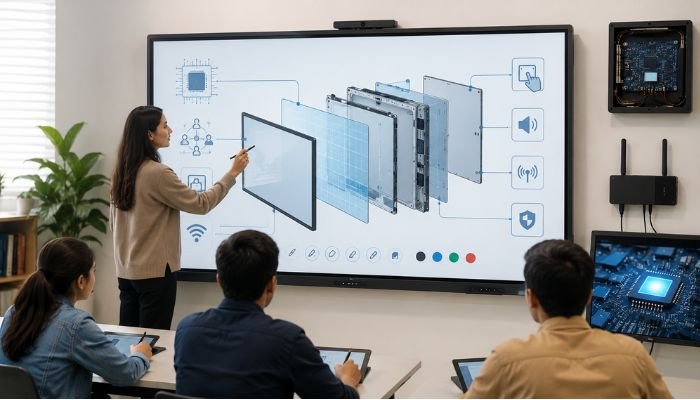
An interactive smart board is not a single component. It is a system — five integrated layers of technology that must all be correctly specified to deliver the experience users expect. Understanding each layer transforms you from a passive buyer influenced by price and brand familiarity into an informed decision-maker who can evaluate any supplier’s claims with confidence.
Smart One Technologies has installed interactive smart boards across hundreds of Pakistani institutions. This guide distils that experience into the clearest, most practical technical explanation available for Pakistani buyers in 2026 — covering every component, every specification that matters, and every local consideration that generic international guides miss.
What Exactly Is an Interactive Smart Board?
The term interactive smart board describes a large-format touchscreen display with a built-in computer — combining the functions of a whiteboard, projector, PC, and video conferencing system into a single integrated device. In Pakistan’s market you will encounter the same product under multiple names: interactive flat panel display (IFPD), digital whiteboard, smart board, electronic whiteboard, interactive LED board, and touch screen display board. All refer to the same core product category.
The critical distinction in 2026 is between modern interactive smart boards — self-contained all-in-one displays with built-in computers — and the older projection-based interactive whiteboards that required a separate projector and PC. All new interactive smart boards supplied by Smart One Technologies through sot.com.pk are self-contained units. No external projector. No external PC required. Everything is inside the board.
Layer 1: The Display Panel — What You Are Actually Seeing
The display panel determines the visual quality of everything shown on the interactive smart board. In 2026, all professional interactive smart boards use LCD technology with LED backlighting in various configurations. Understanding the differences helps you evaluate brightness claims and colour quality specifications:
| Type | Technology | Brightness | Contrast | Colour | Ambient Light | Best Use |
| IPS LCD | Backlit LCD, wide angle | 300–500 nits | Good | Good | Dim light | Entry classrooms |
| 4K LED-backlit LCD | LED array backlight | 400–800 nits | Excellent | Excellent | Good-Very Good | Most boards |
| Mini-LED LCD | Thousands of LED zones | 600–1,200 nits | Outstanding | Excellent | Very Good | Premium corporate |
| QLED | Quantum dot + LED | 500–1,000 nits | Outstanding | Exceptional | Excellent | Boardrooms |
For Pakistani schools and universities, 4K LED-backlit LCD panels represent the optimal value point in 2026 — delivering the image quality, brightness, and longevity that educational environments require at the most accessible price point. Mini-LED and QLED interactive smart boards are justified for premium corporate boardrooms or any space with significant ambient light where superior brightness and contrast are operationally important. Smart One Technologies carries all panel types from 65 to 98 inches at sot.com.pk.
Layer 2: Touch Sensing Technology — The Heart of the Interaction
The touch sensing layer is what transforms a large display into a genuinely interactive smart board. This layer detects exactly where and how you are touching the screen, enabling writing, annotation, gesture control, and multi-user collaboration. In 2026, five distinct touch technologies are used in commercial interactive smart boards:
| Touch Tech | How It Works | Advantage | Limitation | Best For |
| Infrared (IR) | IR beam grid detects touch interruption | Most durable, works with finger/stylus/glove | Slight lag at high speed | Classrooms (most popular) |
| Capacitive | Electric field detects conductive touch | Ultra-precise, fast, smooth feel | Bare finger or cap. stylus only | Premium corporate |
| Electromagnetic (EM) | Pen emits EM signal detected by grid | Sub-mm precision, pressure sensitive | Pen-only input | Design & creative rooms |
| Optical Vision | Cameras track position via image processing | Any stylus, very durable | Complex calibration | Large format |
| HyPen (Hybrid) | EM pen precision + IR finger touch | Best of both worlds | Premium price | High-end education |
For Pakistani educational institutions, infrared (IR) touch technology remains the dominant recommendation for interactive smart boards in 2026 — offering the widest compatibility with any input object (fingers, any stylus, gloves), the greatest durability (no touch coating to degrade), and the widest availability across price ranges. Smart One Technologies supplies both IR and capacitive interactive smart boards with expert guidance on the right technology for each application.
Layer 3: How Touch Processing Works — From Finger to Screen Response
Understanding the touch processing pipeline explains why some interactive smart boards feel responsive and natural while others feel sluggish and frustrating. Here is what happens in the milliseconds between touch and response:
Step 1 — Touch Detection (0–2 ms)
The touch sensing layer scans the screen surface at 120–240 times per second. When your finger, stylus, or palm touches the surface, the sensor detects the change in its scan pattern and records the precise XY coordinates of the touch point along with timing and pressure data (on supported technologies).
Step 2 — Signal Processing (2–10 ms)
A dedicated touch controller microprocessor within the interactive smart board receives the raw coordinates and applies filtering algorithms: distinguishing intentional touches from accidental palm contact, identifying multi-finger gestures (pinch to zoom, swipe, rotate), and calculating motion vectors for smooth ink rendering during handwriting.
Step 3 — OS Processing (10–30 ms)
The processed touch data is passed to the interactive smart board’s embedded operating system (Android or Windows), which maps the touch events to the active application. The quality of the embedded processor and the amount of available RAM determine how quickly this step completes. A board with an underpowered processor shows this bottleneck as visible ink lag — the pen line appears noticeably behind the physical stylus movement.
Step 4 — Display Rendering (< 5 ms)
The result of the touch action is rendered on the interactive smart board display in real time. Total end-to-end latency on premium interactive smart boards from Smart One Technologies is typically under 35 milliseconds — at or below the threshold of human perception, making writing feel natural and immediate rather than delayed.
Layer 4: The Embedded Computer — Processor, OS, RAM, and Storage
Unlike projector-based interactive whiteboards, modern interactive smart boards contain a complete computer. The specifications of this embedded computing system determine daily usability, multitasking performance, software compatibility, and how future-proof the board will be as software requirements grow over its expected 5–10 year classroom or boardroom lifespan.
Operating System: Android vs Windows vs Dual OS
- Android 11+ (always built-in): Provides immediate access to educational apps, whiteboard software, video conferencing (Zoom, Teams, Google Meet), and browser-based content. Android mode is the fastest boot and simplest interface — ideal for daily lesson delivery without technical complexity
- Windows 10/11 (built-in or via OPS module): Provides the complete Windows software library — Microsoft Office, CAD applications, MATLAB, engineering software, institution-specific desktop programs. Required wherever users must run specific Windows applications on the board
- Dual OS (Android + Windows simultaneously available): The optimal choice for 2026 — teachers switch between Android for quick content delivery and Windows for full software capability with a single button press. All premium interactive smart boards in Smart One Technologies’ portfolio offer dual OS as standard
Processor, RAM, and Storage — The Performance Foundation
Budget interactive smart boards in Pakistan’s market are frequently supplied with 4 GB RAM and 64 GB storage — specifications that feel adequate on first use but degrade noticeably within 12–18 months as apps update and content libraries grow. Smart One Technologies recommends 8 GB RAM and 128 GB storage as the 2026 minimum for any new interactive smart board purchase intended for regular use. Paired with an octa-core processor running at 2.0 GHz or faster, this specification ensures smooth performance across all standard educational and corporate applications throughout the board’s operational life.
Layer 5: Connectivity — How the Smart Board Connects to Everything
Connectivity determines how easily teachers, presenters, and students interact with the interactive smart board from their own devices. In Pakistan’s 2026 classroom environment, the following connectivity capabilities are non-negotiable:
Wireless Screen Sharing — The Most-Used Feature in Modern Classrooms
The ability to mirror any smartphone, tablet, or laptop to the interactive smart board wirelessly — without installing apps on student devices, without cables, without IT intervention — is transformative for lesson delivery. Specify Miracast (Android + Windows devices) and AirPlay (iOS + Mac) support as standard. Premium interactive smart boards support simultaneous display of up to four devices in split-screen, enabling real-time comparison of student work.
HDMI 2.0 and USB-C — Reliable Wired Options
HDMI 2.0 input allows any external laptop or PC to display on the interactive smart board via a single cable. USB-C with DisplayPort Alternate Mode goes further — delivering display, audio, USB data, and laptop charging power through a single cable connection, eliminating cable clutter in presentation environments.
Wi-Fi 6 — Essential for Pakistani Multi-Device Classrooms
A Pakistani classroom with 30 students has 30+ active Wi-Fi devices. Wi-Fi 5 interactive smart boards experience measurable performance degradation in these high-density environments. Wi-Fi 6 (802.11ax) handles simultaneous connections from many devices without congestion. All interactive smart boards in Smart One Technologies’ recommended range include Wi-Fi 6 as standard.
Complete Buyer Specification Guide — What to Demand in Pakistan 2026
Use this specification reference when evaluating any interactive smart board purchase:
| Specification | Recommended | Pakistan Buyer Guidance |
| Screen Size | 65–98 inch | 4m: 75″ | 6m: 86″ | 8m+: 98″ |
| Resolution | 4K UHD minimum | Avoid 1080p — already outdated in 2026 |
| Touch Points | 10–20 point | 20-point for multi-user collaborative writing |
| OS | Android 11+ / Windows 11 | Dual OS is best — flexibility without compromise |
| Processor | Octa-core 2.0 GHz+ | Faster CPU = smoother writing & app performance |
| RAM | 8 GB minimum | 4 GB will slow down within 12–18 months |
| Storage | 128 GB minimum | 64 GB fills quickly with lesson content |
| Wi-Fi | Wi-Fi 6 (802.11ax) | Essential for 30+ device classrooms |
| Screen Share | Miracast + AirPlay | Wireless sharing without apps on student devices |
| HDMI | HDMI 2.0 in | External laptop/PC connection |
| USB-C | USB-C DisplayPort | Single cable: display + power + data |
| Speakers | 20W stereo min | 40W+ for large rooms without external PA |
| Brightness | 450 nits minimum | 500+ for rooms with windows |
| Warranty | 3 years on-site | Pakistan-based service — not import warranty only |
Interactive Smart Boards in Pakistan 2026 — Local Considerations
HEC Compliance for Universities
HEC’s Digital Pakistan Education Initiative mandates interactive smart boards in university lecture halls as a QEC compliance requirement. Minimum HEC specifications include a 75-inch display, 4K resolution, dual-touch support, Windows OS compatibility, Wi-Fi, and HDMI/USB-C connectivity. Smart One Technologies provides full HEC compliance documentation with every educational interactive smart board supply, supporting university QEC audit files.
Power Supply Protection
Pakistan’s voltage fluctuations and outages pose genuine risks to the electronics inside an interactive smart board. Smart One Technologies recommends pairing every interactive smart board with an automatic voltage regulator (AVR) or UPS and includes surge protection guidance with every installation.
Why Smart One Technologies Is Pakistan’s Trusted Interactive Smart Board Partner
Understanding the technology is step one. Choosing the right supply and installation partner is step two. Smart One Technologies brings:
- Complete product range: 65–98 inch interactive smart boards in IR, capacitive, and dual-touch from leading brands — all in stock for immediate Pakistan delivery
- HEC compliance documentation: Full QEC audit paperwork with every university-grade interactive smart board supply
- Professional certified installation: Mounting, cable management, network config, LMS integration, software setup across all major Pakistani cities
- Faculty training included: Hands-on training at point of installation — ensuring teachers actually use the technology effectively
- 3-year on-site warranty: Pakistan-based service engineers — not import-only warranty with no local recourse
- AMC contracts: Preventive maintenance, software updates, priority fault response for all interactive smart board clients
- Nationwide coverage: Lahore, Karachi, Islamabad, Faisalabad, Multan, Sialkot, Rawalpindi, Gujranwala, and all Pakistan
Frequently Asked Questions
Q1: How does an interactive smart board differ from a regular smart TV?
An interactive smart board includes a built-in computer (Android/Windows), 10–20 point professional multi-touch, whiteboard and annotation software, LMS integration, wireless multi-device screen sharing, and hardware built for 8–16 hour daily continuous use in educational/corporate environments. A regular smart TV has none of these capabilities — it is a consumer entertainment device, not a professional collaboration tool.
Q2: Which touch technology is best for Pakistan classroom smart boards?
Infrared (IR) touch is the best choice for Pakistani classroom interactive smart boards — durable (no coating to wear), works with any finger/stylus/glove, available at every price point, and easy to maintain. For premium corporate environments, capacitive or HyPen offers superior stylus precision and palm rejection.
Q3: What RAM and processor does a smart board need in 2026?
Minimum specification for a new interactive smart board purchase in 2026: octa-core processor at 2.0 GHz+, 8 GB RAM, 128 GB storage. Boards with 4 GB RAM feel smooth initially but degrade within 12–18 months. Smart One Technologies supplies only boards meeting or exceeding these minimums.
Q4: Can an interactive smart board work without an external PC?
Yes. Modern interactive smart boards have a fully functional computer built in — Android 11+ and/or Windows 11. Teachers access the internet, run presentations, use whiteboard tools, make video calls, and open educational apps directly on the board. An external PC connects via HDMI or USB-C for software not available on the board’s OS.
Q5: What size interactive smart board fits a university lecture hall in Pakistan?
For a standard Pakistani lecture hall with 30–60 seats and 5–8m viewing distance, an 86-inch interactive smart board is the recommended size. For halls with 60–120 seats and 8+ metre viewing, consider a 98-inch display. Smart One Technologies provides free room measurement and size recommendation for all university projects.
Q6: Does Smart One Technologies install interactive smart boards across Pakistan?
Smart One Technologies supplies and professionally installs interactive smart boards in Lahore, Karachi, Islamabad, Faisalabad, Multan, Sialkot, Rawalpindi, Gujranwala, and across Pakistan. Every installation includes mounting, cable management, network setup, LMS configuration, and hands-on faculty training. Visit sot.com.pk for a free consultation.
Conclusion
An interactive smart board is five technologies in one: led display panel, touch sensor, embedded computer, collaboration software, and connectivity infrastructure. Each layer has specifications that matter and specifications that are marketing noise. Now that you understand the difference, you can evaluate any supplier’s proposal with clear eyes.
The right interactive smart board is not the cheapest available or the most expensive brand name. It is the one that correctly matches your room size, your viewing distance, your software requirements, your ambient light conditions, and your budget — and that comes backed by professional installation, faculty training, and genuine after-sales support.
Smart One Technologies is the partner that makes that match — for every classroom, boardroom, and training room in Pakistan. Visit www.sot.com.pk to book your free site survey and consultation today.
Smart One Technologies — Pakistan’s Interactive Smart Board Specialists
www.sot.com.pk | Interactive Smart Boards · 4K Displays · HEC Compliance · Installation ·
0 Comments on “How Interactive Smart Boards Work: A Complete Technical Guide for Buyers”