
| TL;DR — Quick Answer
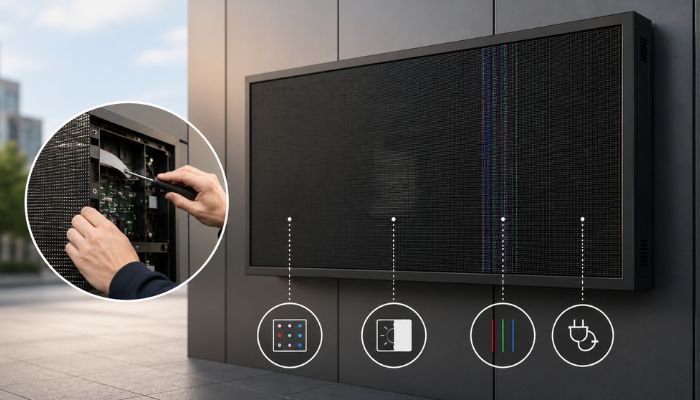
Yes. Most SMD screens problems in 2026 — including dead pixels, flickering, dim zones, color mismatch, ghosting, and partial blackouts — can be repaired at the component level without replacing the entire display. Common fixable issues trace back to a faulty LED module, a loose ribbon cable, an unstable power supply, a misconfigured receiving card, or outdated control software. A full SMD screens replacement is usually only necessary when physical structural damage, widespread water ingress, or end-of-life panel degradation affects the majority of the display. Smart One Technologies diagnoses and repairs these faults at the module and component level, helping clients across Pakistan avoid unnecessary full-display replacement costs. |
If you operate an SMD screens in a retail store, mosque, stadium, control room, or roadside advertising setup anywhere in Pakistan, you have probably faced a moment of panic when part of the display suddenly goes dark, flickers, or shows the wrong colors. The instinctive reaction for many business owners is to assume the worst: that the entire panel needs replacing, and that a costly new purchase is the only way forward.
That assumption is usually wrong. SMD screens are built as modular systems, which means a fault in one section rarely means the whole unit has failed. In most real-world cases that Smart One Technologies handles across Lahore, Karachi, and Islamabad, a malfunctioning display can be brought back to full working condition by repairing or swapping a single module, cable, or control component — not the entire screen.
This article walks through exactly which SMD screens problems are commonly repairable in 2026, what causes them, how a technician diagnoses the real source of the fault, and when replacing the full display genuinely becomes the only sensible option. Whether you manage a single indoor panel or a large outdoor video wall, understanding this distinction can save a significant amount of money and downtime.
Understanding How an SMD Screens Is Actually Built
Before diagnosing any fault, it helps to understand that an SMD screen is not one solid object — it is an assembly of separate, replaceable components working together. Surface-Mount Device technology packs red, green, and blue LED chips into a single compact unit, which is then mounted onto small PCB modules. Dozens or hundreds of these modules are then connected to form the complete display.
Each module receives power and signal data through cables and a receiving card, which in turn is fed by a sending card and a control system. This layered structure is exactly why so many SMD screens problems are isolated to one component rather than spreading across the entire panel — and it’s exactly why most of these issues are repairable without full display replacement.
The Four Core Components Behind Most Faults
- LED modules — the visible tiles where pixels, color, and brightness issues usually originate
- Power supply units — convert AC power to stable DC voltage for the modules
- Receiving and sending cards — manage signal distribution, timing, and image data
- Cabling and connectors — carry both power and data between every component
1. Dead Pixels or Dark Module Clusters
Dead pixels are one of the most common SMD screens problems reported by clients. They appear as small dots, or sometimes entire clusters, that stay black regardless of what content is being displayed. This is typically caused by a failed LED chip, an open circuit inside the module, or long-term heat stress that gradually degrades pixel performance.
The encouraging part is that dead pixel clusters are almost always confined to a single module. A technician can identify the exact faulty module, desolder it, and replace it with a compatible unit — restoring full image quality without touching any of the surrounding panels. This is one of the clearest examples of a fixable display issue that does not require full replacement.
2. Flickering or Unstable Brightness
Flickering on an SMD screens is usually a power-related symptom rather than a sign the panel itself is failing. Loose internal cabling, an aging power supply unit, or voltage fluctuations from the building’s electrical circuit can all interrupt the steady current that LED modules need to maintain consistent brightness.
Diagnosing flicker correctly means checking power delivery first, since replacing a power supply unit or resecuring a loose connector is far cheaper and faster than assuming the entire unit has degraded. In our experience servicing commercial displays across Pakistan, the majority of flickering complaints are resolved at the power and cabling level alone.
3. Color Inconsistency Between Modules
Have you noticed one section of your SMD screens looking slightly warmer, cooler, or dimmer than the rest? This is a calibration issue, not a hardware death sentence. As LED modules age, they don’t always degrade at exactly the same rate — some lose brightness or shift color tone faster than their neighbors, creating a visible patchwork effect across the display.
This is corrected through recalibration using the control system’s color and brightness uniformity software, or in more pronounced cases, by replacing the specific module that has aged out of sync with the rest of the panel. Either way, the fix is targeted and localized, not a reason to replace the entire display.
4. Blank Sections or Partial Blackouts
A section of the display going completely blank while the rest continues working normally is a strong signal that the fault lies in a receiving card or a specific data cable, not the LED modules themselves. The receiving card distributes signal to a defined block of modules; if that card fails or loses connection, every module downstream from it goes dark even though the hardware itself is perfectly fine.
Receiving cards are inexpensive, modular, and quick to swap. Once replaced and recalibrated, the blank section typically returns to full function within minutes. This is consistently one of the fastest and most cost-effective SMD screen repairs available.
5. Image Ghosting or Trailing on Fast-Moving Content
Ghosting shows up as faint trailing images left behind during fast-moving video content, and it is frequently misread as a sign that the panel itself is too old to keep up. In most cases, ghosting traces back to a slower refresh rate setting in the control software, a delay in signal processing, or aging modules whose response time has dropped compared to the rest of the screen.
Adjusting refresh rate settings through the control system, updating firmware, or replacing the specific slower-responding modules typically eliminates ghosting without requiring a full display swap.
6. Distorted Images or No Signal Input
When an SMD screen displays scrambled, misaligned, or completely absent content despite powering on normally, the issue is almost always in the sending card, the control software configuration, or the cable carrying video data — not the display panel. Misconfigured resolution settings, an incorrect cabinet arrangement in the software, or a damaged signal cable can all produce this exact symptom.
This category of fault is purely about signal and configuration. Once the sending card or control software setting is corrected, the SMD screen returns to displaying content exactly as intended, with zero need to replace any physical panel.
When Full Display Replacement Actually Becomes Necessary
To be clear and balanced, not every SMD screen issue can be solved with a component-level repair. There are specific situations where replacing the full display, or a very large portion of it, genuinely is the right call:
- Severe structural damage from impact, fire, or collapse affecting the panel frame itself
- Extensive water ingress that has damaged the majority of modules and internal wiring simultaneously
- End-of-life panel degradation, typically after 8 to 10+ years of continuous operation, where most modules are failing around the same time
- Outdated pixel pitch or resolution that no longer meets current content or viewing-distance requirements
- Repeated, recurring faults in the same area despite multiple component-level repairs, indicating deeper wiring or backplane issues
In every other scenario — which, based on field experience, represents the large majority of service calls — a qualified technician can isolate the actual faulty component and repair the SMD screen without full replacement.
How to Decide: Repair or Replace Your SMD Screen?
A few practical questions can help any business owner make this call before even contacting a technician:
How Large Is the Affected Area?
A single dark module, one flickering section, or one column showing the wrong color almost always points to a localized, repairable fault. If more than half the display is affected simultaneously, the root cause is more likely a shared power or control issue — still often repairable, but worth a closer technical assessment.
How Old Is the SMD Screen?
Displays under five years old rarely need full replacement; the components causing visible faults are usually individually replaceable. Once a screen passes the eight-to-ten-year mark, the cost-benefit of repeated module replacement versus investing in a newer, more efficient SMD screen starts to shift.
Are Spare Parts Still Available?
This is often the deciding factor. If the original manufacturer’s modules, receiving cards, or power supplies are still in production or stocked locally, repair remains the economical choice. Sourcing matched spare parts is part of what determines whether a repair-first approach makes sense.
Why the Modular Design of SMD Screens Works in Your Favor
The single biggest financial advantage of SMD screen technology, compared to older sealed display formats, is exactly this repairability. Because the panel is built from independently replaceable modules, power units, and control cards, a fault rarely forces a complete teardown. This modular architecture is precisely why preventive maintenance and prompt diagnosis pay off — catching a failing module or an aging power supply early prevents it from escalating into a problem that affects neighboring components.
For commercial clients running large-format displays in high-traffic environments — malls, mosques, stadiums, corporate lobbies, and outdoor advertising sites across Pakistan — this translates directly into lower lifetime ownership cost and significantly less downtime than a full-replacement-first approach would produce.
How Smart One Technologies Approaches SMD Screens Repair
At Smart One Technologies, our service process is built specifically to avoid unnecessary full-display replacement wherever a genuine repair is possible. Our technicians follow a structured diagnostic path for every service call involving an SMD screen:
- On-site visual inspection to map the exact location and pattern of the fault
- Power supply and voltage testing using calibrated multimeters and diagnostic tools
- Module-level testing to isolate dead, dim, or color-inconsistent units
- Receiving card and signal chain verification to rule out control-system faults
- Firmware and configuration review to catch software-driven display errors
- Component-level repair or replacement, prioritizing the smallest fix that restores full function
- Post-repair calibration and testing to confirm uniform brightness, color, and signal stability
This approach has allowed clients across Lahore, Karachi, and other major cities to keep their displays running reliably for years longer than a replace-first mindset would typically allow — without compromising on image quality or performance.
Preventive Maintenance: Reducing SMD Screens Problems Before They Start
Many of the SMD screens problems covered in this article can be delayed or avoided entirely with consistent maintenance. A few habits make a measurable difference over the lifespan of any display:
- Scheduled cleaning to remove dust buildup that contributes to overheating and connector corrosion
- Voltage regulation and surge protection to shield power supplies and LED drivers from electrical spikes
- Periodic firmware updates to keep the control system running on the latest stable configuration
- Routine visual and diagnostic inspections to catch dimming or color drift before it becomes visible to viewers
- Keeping a small stock of common spare modules and cables on hand for the fastest possible turnaround
Frequently Asked Questions
Can a flickering SMD screens be fixed without replacing the panel?
Yes. Flickering is most often caused by an unstable power supply, a loose cable, or a failing connector — all of which can be repaired or swapped individually without touching the LED panel itself.
How do I know if my SMD screens needs a full replacement?
Full replacement is generally only necessary when structural damage, extensive water damage, or widespread end-of-life module failure affects most of the display at once. Isolated faults, even multiple ones in different areas, are usually still repairable at the component level.
Is it cheaper to repair an SMD screens than to replace it?
In the large majority of cases, yes. Replacing a single module, power supply, or receiving card costs a fraction of a full display replacement, and the repair can usually be completed within the same service visit.
Does Smart One Technologies offer SMD screens repair services in Pakistan?
Yes. Smart One Technologies provides diagnostic, repair, and maintenance services for SMD screens and LED displays for commercial, retail, religious, and outdoor advertising clients across Pakistan.
Final Thoughts
The next time your SMD screens develops a fault, resist the urge to assume the worst. Dead pixels, flickering, color mismatch, blank sections, ghosting, and signal distortion are all common SMD screens problems with a long track record of being fixed at the component level — quickly, affordably, and without replacing the entire display.
If your SMD screens is showing any of the symptoms covered in this article, Smart One Technologies can diagnose the real cause and recommend the most cost-effective fix. Visit sot.com.pk to get in touch with our technical team for a proper inspection before considering a costly full replacement.
Smart One Technologies | sot.com.pk | SMD & LED Display Solutions, Repair, and Support Across Pakistan

0 Comments on “Which Common SMD Screens Problems Can Be Fixed Without Replacing the Full Display in 2026?”